【Vue.js】初期構築から動かすところまで
投稿 2025年11月24日
最終更新 2025年11月24日
専門用語多め
Vueのプロジェクト作成
vueのプロジェクトを作成します。
下記コマンドをご自身のワークスペース等で実行してください。
※後に出てくるプロジェクト名のフォルダが作成されます
npm create vue@latest
プロジェクト名
プロジェクト名を入力します。
> npx
> create-vue

T  Vue.js - The Progressive JavaScript Framework
|
o  Project name (target directory):
|  vue-project
プロジェクトに含める機能
↑↓キーで選びスペースでチェックのOnOffができ、エンターで次へ進みます。
今回はTypeScript、ESLint、Prettierを選択しました。
*  Select features to include in your project: (↑/↓ to navigate, space to select, a to toggle all, enter to confirm)
|  [+] TypeScript
|  [ ] JSX Support
|  [ ] Router (SPA development)
|  [ ] Pinia (state management)
|  [ ] Vitest (unit testing)
|  [ ] End-to-End Testing
|  [+] ESLint (error prevention)
|  [+] Prettier (code formatting)
実験的機能
ここは特に選択せずエンターです。
*  Select experimental features to include in your project: (↑/↓ to navigate, space to select, a to toggle all, enter to
confirm)
|  [ ] Oxlint
|  [ ] rolldown-vite (experimental)
サンプルコード
サンプルコードが不要かを聞かれているので、Yesにします。
もし必要であればNoにしてください。
*  Skip all example code and start with a blank Vue project?
|  > Yes /   No
ここまで終わるとプロジェクトが作成されます。
コンソールには下記のように表示されているかと思います。
> npx
> create-vue

T  Vue.js - The Progressive JavaScript Framework
|
o  Project name (target directory):
|  vue-project
|
o  Select features to include in your project: (↑/↓ to navigate, space to select, a to toggle all, enter to confirm)
|  TypeScript, ESLint (error prevention), Prettier (code formatting)
|
o  Select experimental features to include in your project: (↑/↓ to navigate, space to select, a to toggle all, enter to
confirm)
|  none
|
o  Skip all example code and start with a blank Vue project?
|  Yes

Scaffolding project in G:\workspace\vue-project...
|
—  Done. Now run:

   cd vue-project
   npm install
   npm run format
   npm run dev

| Optional: Initialize Git in your project directory with:

   git init && git add -A && git commit -m "initial commit"
セットアップ
上記出力で説明されていますが、下記コマンドで依存関係をインストールし、セットアップします。
cd vue-project
npm install
サンプルコード
最初に下記のサンプルコードが入っています。
- src/App.vue
<script setup lang="ts">
</script>

<template>
  <h1>
    You did it!
  </h1>
  <p>
    Visit
    <a href="https://vuejs.org/" target="_blank" rel="noopener">
      vuejs.org
    </a>
    to read the
    documentation
  </p>
</template>

<style scoped>
</style>
試しにそれっぽいカウンター機能を書いてみます。
<script setup lang="ts">
import { ref } from 'vue'

const counter = ref(0)

const inclement = () => {
  counter.value += 1
}
</script>

<template>
  <button @click="inclement">
    カウンター
  </button>
  <p>
    回数:
    <span>
      {{ counter }}
    </span>
  </p>
</template>

<style scoped>
span {
  color: red;
}
</style>
実行
コードが書けたら実行します。
npm run dev
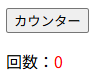 ブラウザでhttp://localhost:5173/にアクセスすると、こんな感じに表示されます。
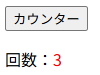
ボタンを押すと数字が1ずつ増えていきます。
まとめ
Nuxt.jsを触る機会があり、もともとのVue.jsも気になっていたので、試しに触ってみました。
書き方もシンプルで使いやすいですね。
まだReact(Next)はあまり触れてないのでいつか触りたいです。
以上、ここまで見ていただきありがとうございます。
皆さまの快適な開発ライフに、ほんの少しでもお役に立てれば幸いです。